


Description
Download Janetter – Free Twitter Client for Mac, Secure Social‑Networking Tool
Overview
Janetter is a free, lightweight Twitter client built specifically for macOS users who want a fast, secure, and customizable way to stay connected with their followers. Developed by Jane, Inc., the application supports eight languages—including English, German, Japanese, Korean, Portuguese, Chinese, Spanish, and French—making it a truly global solution for social‑networking enthusiasts. Janetter’s clean interface lets you monitor timelines, send tweets, manage multiple accounts, and interact with mentions without the clutter of a web browser. Because it runs as a native Mac app, it offers smoother scrolling, native notifications, and lower memory usage compared with the standard Twitter website. Whether you’re a casual user who checks the feed once a day or a power user who needs real‑time streaming and advanced filters, Janetter provides a reliable, free alternative that respects your privacy and works seamlessly on the latest macOS releases.
Key Features
- Multi‑Account Management: Switch between up to ten Twitter accounts without logging out, each with its own customizable timeline and notification settings.
- Real‑Time Streaming: Receive tweets, retweets, and direct messages instantly via Twitter’s streaming API, ensuring you never miss a conversation.
- Customizable Columns: Arrange columns for home feed, mentions, hashtags, lists, and search results exactly how you like them.
- Powerful Filters & Mutes: Create keyword filters, mute specific users, or block retweets from selected accounts to keep your feed clean.
- Native macOS Notifications: Get banner alerts, badge counts, and sound cues that integrate with macOS Notification Center.
- Dark Mode Support: Automatically adapts to macOS dark mode, reducing eye strain during night‑time browsing.
- Language Localization: Full UI translation in eight languages, making it accessible to a worldwide audience.
- Secure OAuth Authentication: Uses Twitter’s official OAuth flow, meaning your credentials are never stored locally.
- Free Updates: Regularly updated to support new Twitter API changes and macOS releases without any hidden fees.
- Export & Import Settings: Backup your column layout, filters, and account list, then restore on a new Mac in seconds.
Installation, Usage & Compatibility
Getting Janetter up and running on your Mac is a straightforward three‑step process. First, visit the official Janetter website and click the “Download for macOS” button. The installer is a signed .dmg file, ensuring the download is secure and free from malware. After the download completes, open the .dmg, drag the Janetter icon into your Applications folder, and launch the app. The first run will prompt you to sign in using Twitter’s OAuth authentication; you’ll be redirected to a secure browser window where you can grant Janetter permission to read and post tweets on your behalf. Once authorized, you’re brought back to Janetter, where you can immediately start adding accounts, customizing columns, and tweaking notification preferences.
Janetter is compatible with macOS 10.13 High Sierra and later, including macOS Ventura, Monterey, and the upcoming macOS Sonoma. The application has been optimized for both Intel‑based Macs and Apple Silicon (M1, M2) devices, delivering native performance regardless of processor architecture. System requirements are minimal: 200 MB of free disk space, 256 MB of RAM, and an active internet connection for real‑time streaming. Because Janetter relies on Twitter’s public API, it works even behind corporate firewalls or VPNs, provided the required ports (HTTPS 443) are open.
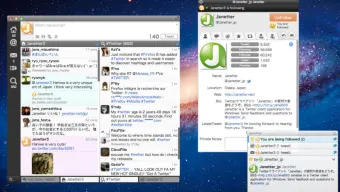
Once installed, the user interface is intuitive. The left‑hand sidebar houses your account list, while the main pane displays columns you add via the “+” button. You can drag columns to reorder them, resize them, or collapse them to save screen real estate. Advanced users can access the Settings panel to configure proxy settings, enable experimental features, or adjust the update interval for non‑streaming timelines. Overall, Janetter balances simplicity for beginners with depth for power users, making it a versatile tool for anyone looking to manage their Twitter presence on macOS.
Pros & Cons
Pros
- Completely free with no hidden subscription fees.
- Native macOS experience with smooth scrolling and system notifications.
- Supports multiple accounts and customizable columns.
- Low memory footprint compared to running Twitter in a web browser.
- Regular updates keep the client compatible with Twitter API changes.
- Secure OAuth login ensures your credentials stay safe.
- Multilingual UI expands accessibility to a global audience.
Cons
- No built‑in image editor for creating media directly within the app.
- Limited integration with third‑party services (e.g., Zapier, IFTTT).
- Occasional delays in receiving push notifications on older macOS versions.
- Feature set is focused on Twitter only; no support for other social networks.
- While the UI is clean, it may feel too minimal for users who prefer richer visual themes.
FAQ & Conclusion
Is Janetter completely free, or are there hidden costs?
Janetter is 100 % free to download and use. There are no subscription fees, no in‑app purchases, and no hidden charges. The developers fund the project through optional donations, but using the core features does not require payment.
Can I use Janetter on Windows or Linux?
Janetter is currently built exclusively for macOS. The development team has not announced plans for Windows or Linux versions, so Mac users are the primary audience.
How does Janetter protect my Twitter credentials?
The app uses Twitter’s OAuth 2.0 authentication flow. When you sign in, you are redirected to Twitter’s official login page, and only an access token is stored locally. Your password never touches Janetter’s servers.
Can I customize the look of Janetter beyond dark mode?
Janetter offers limited visual customization: you can switch between light and dark themes, adjust column width, and hide/show UI elements. Advanced theming or custom CSS is not currently supported.
Does Janetter support Twitter Spaces or Fleets?
As of the latest update, Janetter includes basic support for Twitter Spaces notifications but does not provide a built‑in audio player. Fleets have been discontinued by Twitter, so the client no longer shows that feature.
In summary, Janetter stands out as a fast, free, and secure Twitter client tailored for macOS users who demand a native experience without the overhead of a web browser. Its multi‑account handling, real‑time streaming, and extensive language support make it a solid choice for both casual tweeters and social‑media professionals. While it lacks some advanced media‑editing tools and cross‑platform availability, the core functionality is robust, regularly updated, and respects user privacy. If you’re looking to streamline your Twitter workflow on a Mac, Janetter is definitely worth a download.
Ready to boost your Twitter productivity? Click the button below to download Janetter for free, install it in minutes, and start tweeting with confidence.
Guides & Tutorials for Janetter
How to install Janetter
- Click the Preview / Download button above.
- Once redirected, accept the terms and click Install.
- Wait for the Janetter download to finish on your device.
How to use Janetter
This software is primarily used for its core features described above. Open the app after installation to explore its capabilities.
User Reviews for Janetter 0
No reviews found





.webp)